Showing posts with label Featured. Show all posts
, , , , , , ,

Social networking Now more fun with Our SocioToolbar!
Share |
Monday, March 22, 2010 0 comments

OrkutKnol toolbar


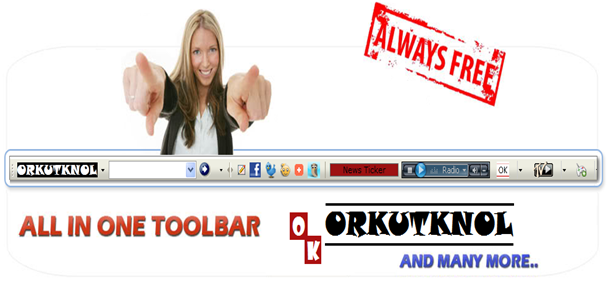
OrkutKnol Is introducing you to a new way of social networking within toolbar! Today we are introducing our whole new toolbar SocioBarKnol! Actually this is mixed from Social networking. Toolbar & OrkutKnol!

This toolbar comes With integrated Facebook, Mini Orkut & Twitter, Addthis ShareBar, Bit.ly  handy Url shortener & HootSuite Instant share button!


Features 

  • OrkutKnol toolbar comes with More of Social Networking, Entertainment like Music (Radio), TV, Games. You also get to know what’s the current temperature! Isn’t it wonderful?

orkutknol toolbar with Handy social links, Entertainment features like Music, games & TV

OrkutKnol toolbar with mini orkut ,twitter and Facebook!


  • This Toolbar comes with an instant Email notifier. Once you setup your account, you can instant alerts once you get any new email.

Email more faster & secure!   you get easily notified about any new email

  • You are more secured as this toolbar does not compromise with your privacy! You can enable/disable Popup blocker […] .


  • This toolbar also comes with Handy links to Orkut & Orkutknol. you can now easily surf Orkut & Orkutknol!

Handy links to Orkut & Orkutknol


  • Now Share More Easily on almost any social network and other sites as this toolbar comes with AddThis sharebar. Now share links across the web more easily than ever! You also get to share links easily via HootSuite!
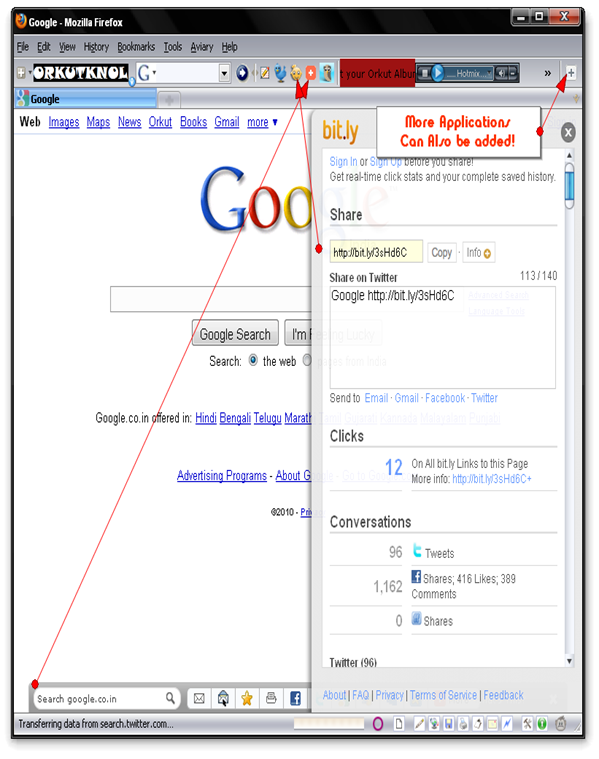
Addthis sharebar, hootsuit integrated, Bit.ly sidebar!

  • This toolbar also comes with Bit.ly URL shortener, that is you can shorten a link more easily with just a click!
  • You can also personalize this toolbar by adding more applications from the directory (Conduit Applications Directory) which includes Games, Entertainment & much more!


So what are you waiting for just install this toolbar & enjoy the social web!

,

Shorten Your Orkut Profile URL with OrkutKnol!

Share |
Monday, February 1, 2010 0 comments

Irritated by the Long url given by Orkut to your Profile? Today OrkutKnol ha made it possible for you to shorten your profile url with a small url like YourName.TK .


The Tool!


How to Use?

  1. First copy your profile url by visiting your profile.
                          image
  2. Then paste the URL in the widget on OrkutKnol & then click the Go Button ( >>).image
  3. Now chose your new Shortened URL for your profile.

    image

  4. Now Select whether you would like to register anonymously or by registering. Just select register anonymously for fastening your work. If you would like to edit your profile URL afterwards then you can select to register.

You are Done! Now share this url with your Friends to have an easy access to your profile! 


What ? Does it matches with OrkutKnol.tk? Yes! we are giving away free top level domains for free!

    , ,

    Go Black on Orkut and Help save Environment!

    Share |
    Saturday, January 30, 2010 0 comments

    orkut initiative


    First of all i would like to tell you that black colour saves energy because the screen is predominantly black. "Image displayed is primarily a function of the user's colour settings and desktop graphics, as well as the colour and size of open application windows; a given monitor requires more power to display a white (or light) screen than a black (or dark) screen."


    You can help save the energy & We believe that there is value in the concept because even if the energy savings are small, they all add up.


    How can you Participate ?

    You can participate by turning your Orkut theme to black colour.


    orkut initiative - Copy


    This way every time you load your Orkut account, you will save a little bit of energy. Remember every bit counts! You will also be reminded about the need to save energy each time you see the Black Orkut page load.


    You can even also spread the message by updating your status or by  telling your friends about this concept.


    Think what earth has given to you. Now it is the time to pay back .

    ,

    Orkutknol for mobile users! – M.OrkutKnol.TK

    Share |
    Saturday, January 23, 2010 0 comments

    orkutknol mobile preview OrkutKnol is now more than 20 days old . Some days back we introduced our new feature – OrkutKnol! toolbar. Today we are introducing our new feature – Orkutknol for mobile users . You can visit orkutknol via your mobile from M.Orkutknol.Tk . Our mobile website is friendly with almost all smart mobiles. JavaScript enabled mobiles will be forwarded to M.orkutknol.tk from Orkutknol.tk automatically. So what's your views on our mobile website ! Drop in your comments…

    , , ,

    How To Get Back Your Hacked Gmail/Orkut/Google Account!

    Share |
    Wednesday, January 20, 2010 0 comments

    hacked_11-500x375

    With the recent cyber attacks on Google in china, Even if you think you are secured, But you may not be! Even if you think you must wait & first read this post.

    As google is a multi functional website offering us many services like Gmail, orkut, Blogger, Picassa, chackout, ADSENSE . It would become a worst nightmare if our Google accounts gets hacked!

    Like many other online services Google tries to protect your account with secret question as well as optional

    secondary email address. But there is one more official option which only Google Provides!

    1. Trying “Forget Password Option” :

    I know this will not work in most cases, as options like forget password rely on secondary email address and security question, both of which can be easily changed once a account gets hacked. Still you should try at least once as most password gets hacked by script kiddies and not by real hackers.

    So go to Forget Password form first!

    2. What if the above option Fails ?

    You can try the “CONTACT FORM “ option by google. Please go through the following information before submitting the form. (That’s why i am not providing you the link above ) :

    • Your goal should be to give Google maximum & accurate data! So take your time and submit form with maximum amount of information possible. You can consult your trusted friends if you are not sure. As an example it could be Sam or Bob who invited you on orkut. If you are not sure call them up and ask it!
    • Submit only one form! Yes this should be common sense. Do not submit multiple forms. A person who uses around 10-15 Google products asked me if he can submit multiple forms mentioning different Google products.
    • Submit form from the place which you use most often to access your account like PC at home! Although they haven’t mentioned this explicitly, line above submit button says, “Please note that we need your IP address in order to resolve this issue. Your IP address will be captured automatically when you submit this form.”

    Few things as example which google can ask :

    • Last successful login date
    • Account creation date
    • Google products you used with this account and the date you started using each one
    • Details about Orkut account (if you use Orkut)
    • Details about Blogger account (if you use Blogger)

    Google quoted:

    If you've already tried to reset your password and you're still unable to access your Google Account, fill out the form below. Please answer each question as thoroughly and accurately as possible; the strength of your answers will determine if we can return your account. If you're not certain about some of the dates, provide your closest estimate.

    Contact Form Link .

    What if everything fails ?

    If both the option fails you can make another account as there is no other option left :( .

    Even if your account is not hacked you must go through the contact form & note the required information at some private place as no one knows what can happen …

    If you have any more method you can leave in the comments section below.

    ,

    Download Our Multifunctional tollbar with Orkut Share button!

    Share |
    Saturday, January 16, 2010


    All OrkutKnol Toolbar Features


    One click share button - share any page on orkut !


    Listen to FM radio & watch TV while surfing WEB!


    Shortcut buttons for main pages of orkut!


    E-mail notifier supporting all email clients!


    Pop-Up blocker - No compromise in security!


    & many more. Just download & install to know!


    , , ,

    Retweet And Win Hostgator Webhosting: OK first Giveaway !

    Share |
    Sunday, January 10, 2010 1 comments

    Hello world! We are giving away a free Wordpress Premium Account for 3 months worth $15. This is our first giveaway which is intended only for bloggers. So this giveaway is intended to provide a platform for users who are still on Blogspot and never tried wordpress because of lack of funding. We are sorry that we can’t entertain everyone here with hosting, so this giveaway will decide the lucky winner who will win Premium Hosting worth 15$. Contest Prize We are giving away Godaddy Economy Plan three months subscription which is worth 15$. You get 10 GB Space, 300 GB Transfer, 100 Email Accounts,10 MySQL Databases... (for more information go here and see the economy plan). How to Participate : To participate in the contest all you need to do is :

    • ReTweet this :
      Giveaway : Retweet and #win #GoDaddy Free #Wordpress #Webhosting http://bit.ly/7gfi2k
    • Comment with your tweeted link (do follow @OrkutKnol ).
    • Subscribe with your email address to Orkutknol (from the "Stay Connected" widget in the sidebar).
    How Winner will be selected : All the participant, who have completed all the above 3 points, will be eligible for participation. And Final winner will be decided via Random draw using random.org. Winner will be announced on 24th of January 2010. So Best of Luck to all the participants.

    Web Analytics Clicky